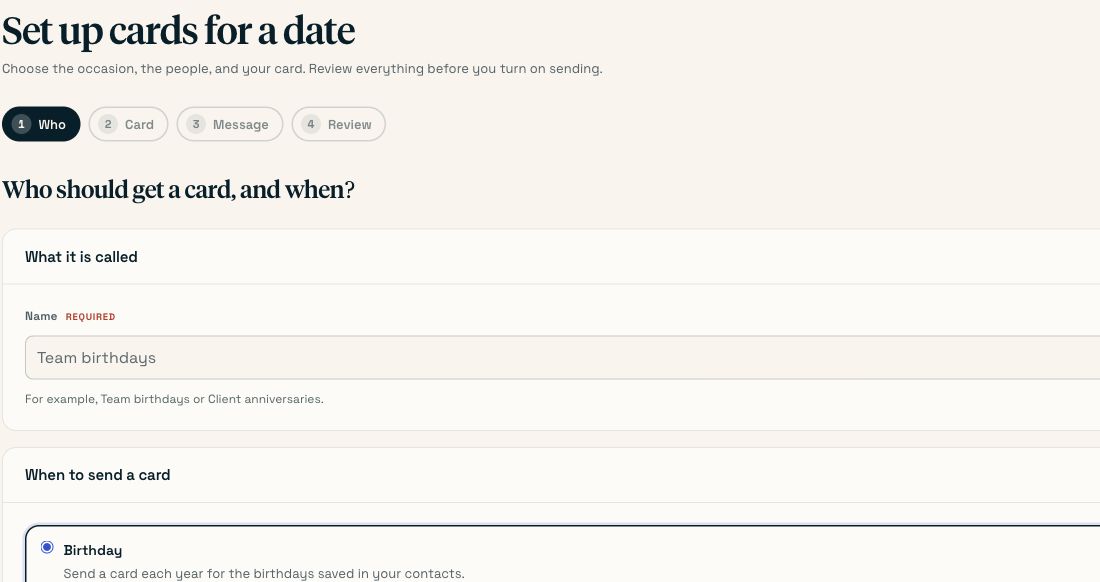
How do I set up automated birthday cards?
No code needed
Import your contacts with a birthday column, then create an automation with the Birthday trigger, a message, a card design and a lead time of at least 10 days. Run it once by hand to see who it would write to, then switch it on. From then on it writes one card per person per year, on its own, and it will never send the same person two cards for one birthday.
On this page
This is the guide for the person who has a spreadsheet of staff or clients, wants a real card to land on each of their birthdays, and does not want to think about it again. It takes about twenty minutes once. Nothing here needs a developer.
#Step by step
Get the birthdays into Scribble
Go to Contacts → Import contacts. Drop your CSV in, or select the cells in Excel or Google Sheets — including the header row — copy, and paste them into the box.
On the mapping screen, make sure one of your columns is mapped to Birthday. Scribble recognises headers called
birthday,birthdate,date of birth,dob,bdayandbornautomatically; anything else you set by hand from the dropdown.Work through the Fix problems step. Rows without a complete address cannot ever be mailed, so deal with them here rather than discovering it in December.
You’ll know it worked when The Contacts page shows a With a birthday count that matches the number of people you expect. If it says 0, the birthday column did not map — go back and set it manually.
Put those people on a list
Go to Contacts → Lists and create a fixed list, for example Staff or Clients, and add the people this rule should watch.
This step is optional — a rule with no list watches everyone in the address book — but it is worth doing. Lists change and the rule follows them: someone added to the list next March is watched from next March, with no edit to the rule.
You’ll know it worked when The list shows a member count.
Create the design the cards will use
Go to Designs → New design and either pick a birthday card from the catalogue or upload your own artwork. Name it something you will recognise next year, like Staff birthdays 2026.
Skip this and the rule uses your organisation's default card, which is fine to start with.
Create the automation
Go to Automations → New automation. The whole rule is one screen, six decisions.
Under What it watches, choose Birthday. Only contacts with a birthday on file can ever match; the screen tells you how many that is right now.
Under Who it watches, choose the list you made, or leave it as everyone.
You’ll know it worked when The screen says something like 3 contacts are eligible right now. If it says the list has nobody with a birthday on file, stop and fix the import — the rule would otherwise send nothing, forever, silently.
Write the message
Type the message that gets written on the card. Merge fields go in with double braces:
{{first_name}},{{full_name}},{{company}},{{job_title}},{{city}},{{state}}and{{sender_name}}are always available. Any extra column from your spreadsheet becomes a field too, named after the column.Set Signed by to whatever
{{sender_name}}should become — a person's name, or the company's.A message that works Happy birthday, {{first_name}}! Everyone here is glad you're on the team. Have a brilliant day — and take the afternoon if you can get away with it. {{sender_name}}You’ll know it worked when Every contact the rule watches has a value for every field you used. A contact with no
{{company}}is skipped with a reason rather than sent a card with a hole in it.Set the lead time to at least 10 days
Days ahead is how far in advance of the birthday the card is made, so it lands on the day rather than after it.
The field defaults to 5. Five is not enough. A single card needs seven working days from creation to the doormat, which is nine to eleven calendar days once weekends are counted. Set this to 10 at the very least, and 14 if the date matters.
Leave Catch-up window at 7. That is how many missed days a run looks back over if the scheduler ever skips one. It cannot cause a double send — see the note below.
You’ll know it worked when The live summary at the bottom of the form reads: every day the scheduler looks 14 days ahead and writes a card for anyone whose date lands then.
Cap the annual spend
Set Cap for the year to a number you are comfortable with. An evergreen rule against a growing list is an open-ended bill; with a cap the rule stops at that many cards and tells you, instead of quietly spending. The count resets on 1 January.
A sensible cap is your headcount plus about 20%.
Run it once by hand before you trust it
Save the rule, then use Run now on the automation. It reports exactly who it matched, who it would write to and who it skipped and why, without you having to wait for a birthday.
Read the skip reasons. No credits left, On your do-not-mail list and the message needs
{{company}}, which this contact has no value for are all things you would rather know now.You’ll know it worked when The run log lists the people you expected, with the occurrence date matching their birthday.
Switch it on
Set the rule to on and save. Nothing sends the moment you save: the scheduler runs once a day, and the rule joins it from the next run.
You’ll know it worked when The rule shows as active, and within a day or so you will see cards appearing under Sent cards tagged with the automation's name.
#Why it cannot send two cards for one birthday
This is the failure everybody worries about, and it is guarded at the database rather than in the code that decides. Every card an automation creates first claims a unique (rule, contact, occurrence date) row. A second attempt at the same claim collides and stops. That is why the catch-up window is safe: a run that re-checks the last seven days re-checks days that are already claimed, and each one costs one rejected insert rather than one card.
It also means a Cloudflare cron retry, a deploy that overlaps a run, or you pressing Run now in the middle of a sweep cannot produce a duplicate. See how automations work.
#What about 29 February?
In a leap year the card goes out on the 29th. In every other year it goes out on 28 February. A card that arrives once every four years is a bug, not a policy.
#When it goes wrong
| Symptom | Cause | Fix |
|---|---|---|
| The rule never sends anything | No contact it watches has a birthday on file. | Check the With a birthday count on Contacts. If it is 0, re-import and map the birthday column explicitly. |
| Cards arrive after the birthday | Days ahead is too short — 5 is the default and it is not enough. | Raise it to 10–14. Existing scheduled cards keep their dates; the change applies to the next run. |
| Some people are skipped every year | Their message is missing a merge value, or their address is incomplete, or they are on the do-not-mail list. | Run the rule by hand and read the skip reasons — each one names the person and the reason. |
| The rule stopped part-way through the year | The annual cap was reached. | Raise the cap. The counter resets on 1 January, so a rule capped at 500 does not stay stopped in its second December. |
| The rule stopped sending entirely | The credit balance hit zero. | Top up. Anyone skipped for credits is picked up on the next run, provided their occurrence date is still inside the catch-up window. |
| A card shows as Held | The address cannot be written on an envelope — usually a missing street line, city, state or ZIP. | Open the card, fix the contact, and send that one by hand. A held card is not charged. |
#Common questions
- Do I have to store a year of birth?
- No, and Scribble does not keep one. You can import a full date if that is what your HR export produces, but only the month and the day are stored.
- What happens when someone joins the list mid-year?
- They are watched from the moment they are on the list. If their birthday has already passed this year, the first card goes out next year. If it is still ahead and outside the lead time, they get one this year.
- What happens when someone leaves?
- Remove them from the list and the rule stops watching them. If they should never be written to again by anyone in your company, add them to the do-not-mail list instead — that survives the next spreadsheet re-import putting them straight back.
- Can I have different cards for staff and clients?
- Yes. Build two rules against two lists, each with its own design and message. Rules do not interfere with each other, and each carries its own cap.
- How much does this cost?
- One credit per card, at whatever rate you bought your credits at. A 60-person team is 60 cards a year: at the 100+ rate of $5.59 that is about $335 a year, postage included.
- Can I preview what a card will look like before it sends?
- Run the rule by hand to see who it would write to, and send one card to yourself as a one-off campaign using the same design, handwriting and message to see the physical article.
Last checked against the product on . Something wrong or missing? Tell us.