How do I import contacts from a CSV?
No code needed
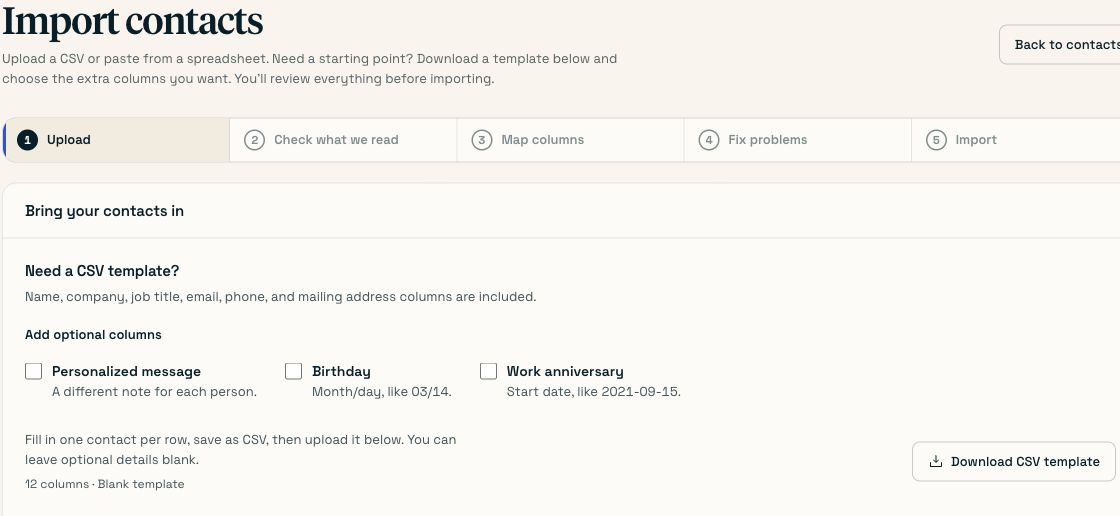
Go to Contacts → Import contacts and either drop a CSV in or paste cells straight out of Excel or Google Sheets. You then confirm what Scribble read, map each column to a field, and work through anything wrong. Nothing is saved until you press import — the file is read in your browser first.
On this page
Open the importer
Contacts → Import contacts.
Get the data in
Drop a CSV onto the page, choose a file, or select the cells in Excel or Google Sheets — including the header row — copy, and paste them into the box.
Comma, tab, semicolon and pipe separated files are all detected automatically. Quoted commas and addresses with a line break inside them are handled.
You’ll know it worked when You see a preview table of your real rows with your real headers.
Check what Scribble read
Look at the preview before the mapping. If the columns are shifted, the delimiter was guessed wrong or a quote is unbalanced in the source file — fix that in the spreadsheet and re-paste.
Map the columns
Common headers are matched automatically. Anything unmatched you set from the dropdown, against the preview row underneath, so you are confirming column G is the ZIP against evidence rather than trusting a guess.
Columns you do not map to a known field are still kept: each becomes a custom field, named after the header in snake_case, and available as a merge field in messages. A column called Personal note becomes
{{personal_note}}.You’ll know it worked when No required field is unmapped. The importer will not let you continue while a street line, city, state or ZIP has nothing pointing at it.
Fix the problems
The triage screen groups rows by what is wrong with them, with counts: 1,183 ready · 41 need attention · 16 duplicates. Each one is fixable in place or skippable.
Some are fixed for you with a nod: a state written as California becomes
CA, a ZIP with stray spaces is tidied. Those are shown as we changed this rather than applied silently.You’ll know it worked when The need attention count is zero, or every remaining row is one you chose to skip.
Import
Only now does anything touch the database.
You’ll know it worked when The Contacts page shows the new total, and the With a birthday count reflects any birthdays you mapped.
#Headers that map automatically
Drawn from what HubSpot, Salesforce, Shopify, Mailchimp, BambooHR and Google Contacts actually export, plus the things people type. Matching ignores case, spaces and punctuation.
| Field | Headers recognised |
|---|---|
| First name | first name, firstname, fname, given name, forename, first |
| Last name | last name, lastname, lname, surname, family name, last |
| Full name | full name, name, contact name, recipient, display name, employee name |
| Company | company, company name, organization, org, account, business, employer |
| Job title | job title, title, role, position, designation |
email, email address, work email, primary email, mail | |
| Phone | phone, mobile, cell, telephone, tel, work phone |
| Address line 1 | address, address1, address line 1, street, street address, mailing street, line1 |
| Address line 2 | address2, apt, apartment, suite, unit, line2 |
| City | city, town, locality, mailing city |
| State | state, province, region, mailing state, state province |
| ZIP | zip, zip code, postcode, postal code, mailing postal code |
| Country | country, country code, nation |
| Birthday | birthday, birthdate, date of birth, dob, bday, born |
| Work anniversary | work anniversary, start date, hire date, anniversary, join date, date hired |
#Where the AI is, and where it is not
Scribble uses a model for exactly one thing: suggesting a field for headers the deterministic matcher could not place. It never touches the contents of a cell. A model deciding column G is a postcode is a suggestion you confirm against a preview; a model rewriting an address is a physically mailed card to the wrong person, with no undo.
#When it goes wrong
| Symptom | Cause | Fix |
|---|---|---|
| Columns are shifted in the preview | The delimiter was guessed wrong, or a quote is unbalanced. | Re-export as a comma-separated CSV, or paste the cells directly rather than uploading. |
| With a birthday shows 0 after import | The birthday column was not mapped. | Re-import and set the mapping by hand. The existing contacts update rather than duplicate if you include the same identifying fields. |
| Everyone shows as needing attention | The address columns are mapped to the wrong fields. | Go back to mapping and check against the preview row. |
| A merge field is empty for some people | That column was blank for those rows. | Fill it in, set a fallback on the campaign or rule, or take the field out of the message. |
| Duplicates after a second import | The second file identified people differently. | Keep the identifying columns consistent between exports. |
Last checked against the product on . Something wrong or missing? Tell us.