

Most people write a handful of formal letters a year: a claim to a supplier, a notice to a landlord, a letter to the county about a permit, a thank-you that deserves better than email. The format is the part everyone looks up, and it's simple once you've seen it laid out with real measurements.
Below: the standard US settings, each part with an example, the three layouts compared, four complete letters and how to send them. Where the big style guides disagree, I say so and give the safe choice. The names and businesses in the examples are invented.
The parts of a business letter, in order
Here's every part a US business letter can have, from the top of the page down. Seven appear in every letter. The ones marked optional show up only when you need them.
- Letterhead, or your return address if you're on plain paper
- Date
- Inside address: the recipient's name, job title, company and mailing address. An attention line, when you need one, is its first line.
- Reference or subject line (optional), such as Re: Invoice 30517
- Salutation, such as Dear Ms. Ruiz:
- Body
- Complimentary close, such as Sincerely,
- Signature, with your typed name and job title under it
- Reference initials (optional), when someone else typed the letter
- Enclosure notation (optional), when something else is in the envelope
- Copy notation (optional): c: or cc: and the names of anyone else getting a copy
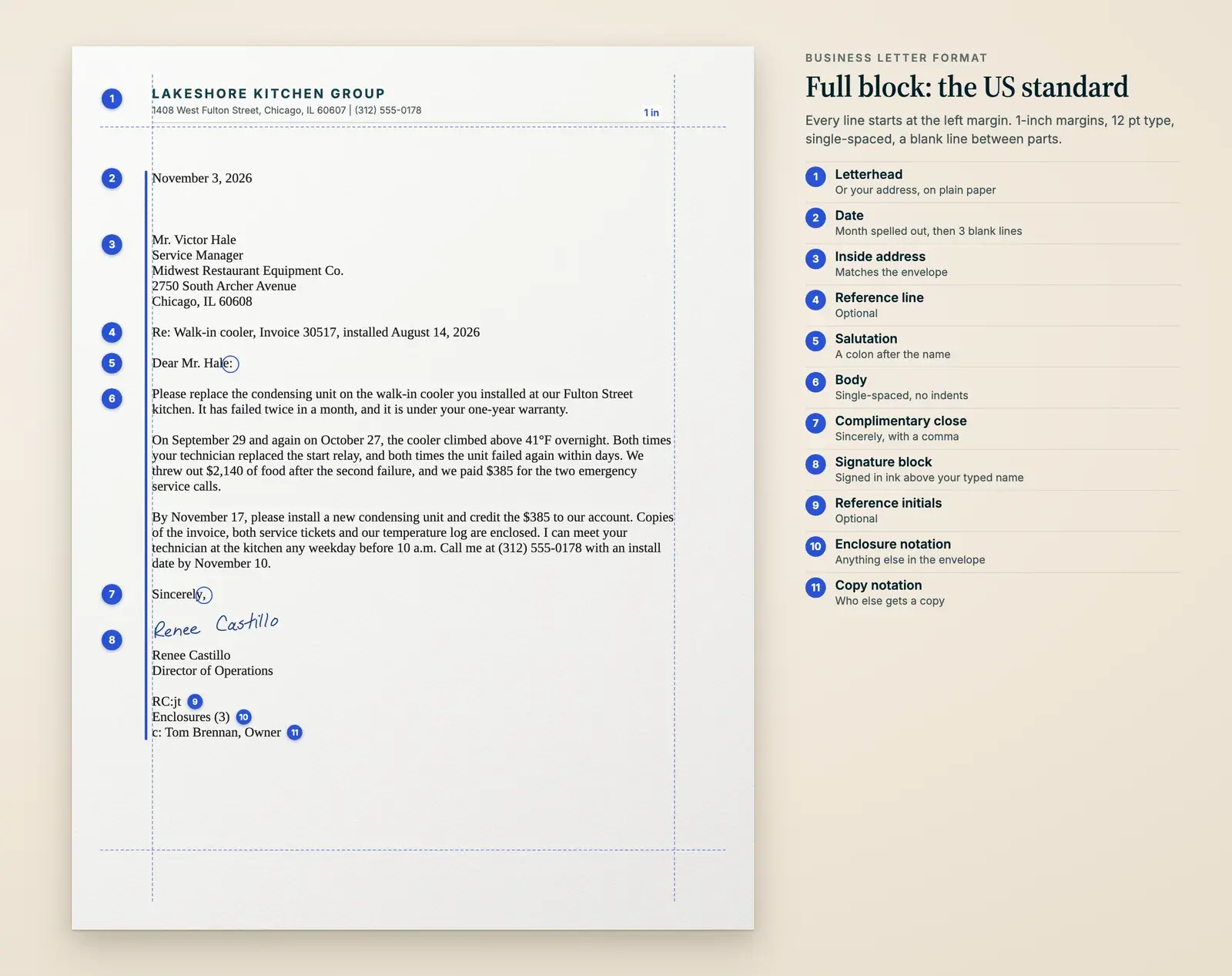
Business letter format settings: margins, font and spacing
These settings are for a one-page letter in full block, the layout Purdue's Online Writing Lab (OWL) calls the most common. Set them once and save the file as your template.
Scroll the table horizontally if needed.
| Setting | Standard | Notes |
|---|---|---|
| Paper | US Letter, 8.5 by 11 inches | Letterhead for page 1 only. Any later pages go on plain paper that matches it. |
| Margins | 1 inch on all sides | It's Word's default. Center a short letter on the page rather than widening the margins. |
| Font | 11 or 12 point | Times New Roman 12 is the traditional default. Arial and other plain fonts are fine. |
| Alignment | Flush left | Leave the right edge ragged. Justified text opens uneven gaps between words. |
| Line spacing | Single | One blank line between paragraphs and between parts. No indents in full block. |
| Date | Month spelled out: November 17, 2026 | Two lines below the letterhead, or about 2 inches from the top on plain paper. |
| Gap after the date | 3 blank lines (press Enter 4 times) | Guides range from 1 line to 4. Add space on a short letter. |
| Signature space | 3 blank lines | Between the close and your typed name. Some guides say 4. |
| Length | One page | Three or four short paragraphs. |
One trap in Word: its default style adds space after every paragraph, so a blank line between paragraphs becomes a double gap and the address lines drift apart. Before you type, choose Design > Paragraph Spacing > No Paragraph Space. Then press Enter once at the end of each line and twice between paragraphs.
Letterhead or return address, and the date
On letterhead, start with the date, two lines below the letterhead. The letterhead already carries your company name and address, so don't type them again.
On plain paper, type a return address at the top: business name, street address, city, state and ZIP, plus a phone number if you want calls. Writing as yourself, to a landlord or a government office? Same format with your home address, and leave your name off. It goes under your signature.
Return address and date on plain paper
Rivera Tile & Stone 418 Commerce Drive Santa Fe, NM 87507 (505) 555-0162 November 17, 2026
On letterhead, the date is the first line you type.
Use the date you finish the letter, written the American way with the month spelled out: November 17, 2026. No ordinals (17th), and no numbers-only dates. 11/12/2026 is November 12 to an American and 11 December in most other countries.
How to address a business letter: inside address, attention line and salutation
The inside address is the recipient's mailing address, flush left, exactly as it will appear on the envelope: courtesy title and full name, job title, company, street address with any suite number at the end of the line, then city, state and ZIP.
Inside address
Ms. Teresa Ruiz Director of Facilities Alder Creek Library District 2200 Grand Avenue, Suite 140 Boise, ID 83702
Use Ms. unless you know she prefers Mrs. or Miss. Use Dr. for a doctor and Mx. for someone who uses it. Not sure which title someone uses? Drop it and use the full name.
Writing to a company or a department instead of a person? Make the attention line the first line of the inside address, above the company name. That's where the Postal Service puts it on the envelope, so the two match. Our guide to ATTN lines has more examples.
Inside address with an attention line
ATTN: Accounts Payable Granite Peak Outfitters 1150 Industrial Way Ogden, UT 84401
With an attention line, the salutation greets the department (Dear Accounts Payable Team:) or the company (the traditional Ladies and Gentlemen:).
The salutation repeats the name from the inside address, title included, and ends with a colon: "Dear Ms. Ruiz:". Purdue's OWL says never a comma; the comma is for personal letters. If you'd call her Teresa in person, "Dear Teresa:" is fine, still with the colon. If you don't know which title someone uses, write the full name: "Dear Jordan Lee:".
Don't know the name at all? Look first. The company website, LinkedIn or one call to the front desk usually turns it up. If it doesn't, work down this list:
- Dear Facilities Director: when you know the job.
- Dear Accounts Payable Team: when you know the department.
- Ladies and Gentlemen: for a letter to a company with no person named. It's old-fashioned, but still taught.
- Skip "Dear Sir or Madam," which the Mayfield Handbook says to avoid, and "To Whom It May Concern," which Iowa's Tippie template calls outdated.
How to write the body of a business letter
A reference line tells the reader which file to pull: Re: Invoice 30517, or Re: Lease for Unit 4B. It goes above the salutation with a blank line on each side. A subject line does the same job in words (Subject: New cleaning night starting January 6). Traditional typing instruction puts it just below the salutation, and many templates put it above, like a Re: line. Both are correct; pick one spot and keep it.
The body is single-spaced, with a blank line between paragraphs and no indents in full block. Aim for one page, in a shape that fits nearly every business letter:
Three paragraphs that cover most letters
Why you're writing
One or two sentences, with no warm-up like "I am writing to inform you that." The reader should know the point before the first paragraph ends: "Starting January 6, we'll clean your office on Wednesday nights."
What they need to know
Dates, amounts, invoice and order numbers, what has already happened. In a complaint, facts persuade better than adjectives.
What happens next
The action, who takes it and by when, plus a direct phone number if you want a call. Keep every paragraph short; around 100 words is plenty.
How to end a business letter: closing, signature and notations
Leave a blank line after the last paragraph, then type the complimentary close. Capitalize only the first word and end with a comma, so it's "Best regards," with a small r. If you used open punctuation, with nothing after the salutation, leave the comma off here too.
Scroll the table horizontally if needed.
| Closing | Formality | Use it for |
|---|---|---|
| Sincerely, | Formal | Any business letter. The safe default. |
| Sincerely yours, or Yours truly, | Formal, older style | The same letters, if you like the traditional sound. |
| Thank you, | Formal | A letter that asks for something, or thanks someone. |
| Best regards, or Regards, | Less formal | A business contact you know personally. |
| Warm regards, or With thanks, | Warm | A client or colleague you know well. |
Press Enter four times after the close and type your full name, with your job title on the next line. Add the company name under your title only if the letter isn't on letterhead. Sign in ink in the space above your typed name. For a PDF, you can sign it electronically in Adobe Acrobat Reader or add a scan of your signature.
Notations go below the signature block, after a blank line, each on its own line:
- Reference initials, only when someone else typed the letter: the writer's initials in capitals, then the typist's in lowercase (RC:jt).
- Enclosure notation: Enclosure: Service ticket 4471, Enclosures (3) or the short Enc. (Writing@CSU lists all three). Count documents, not pages, and mention each enclosure in the body too.
- Copy notation: c: or cc: and the name of everyone getting a copy, one name per line if there are several.
- Blind copy: bcc: appears only on the blind copy and your file copy, never on the original. That's the point of it.
Closing, signature and notations
Sincerely, Renee Castillo Director of Operations RC:jt Enclosures (3) c: Tom Brennan, Owner
The three blank lines between Sincerely and the typed name are where you sign.
How to format the second page of a business letter
Most business letters fit on one page, and it's worth editing to get there. If yours runs over, print page 2 on plain paper that matches the letterhead and start it with a header, so a page that gets separated can find its letter again. The Mayfield Handbook lists what the header needs: the recipient's name, the date and the page number.
Second-page header
Ms. Teresa Ruiz Page 2 November 17, 2026
Or set all three on one line: the name at the left margin, the page number centered and the date flush right. Leave a couple of blank lines under the header before the text continues.
Carry at least two lines of the body onto the new page, and never send a page that holds only the close and your signature. The Mayfield Handbook is firm on both.
Full block vs modified block vs semi-block
All three layouts use the same parts in the same order. What changes is where four of those parts start on the line, and whether paragraphs are indented.
Scroll the table horizontally if needed.
| Part | Full block | Modified block | Semi-block |
|---|---|---|---|
| Return address (plain paper only) | Left margin | Starts at the center | Starts at the center |
| Date | Left margin | Starts at the center | Starts at the center |
| Inside address and salutation | Left margin | Left margin | Left margin |
| Paragraphs | Flush left | Flush left | First line indented 1/2 inch |
| Close and signature block | Left margin | Starts at the center | Starts at the center |
| Notations | Left margin | Left margin | Left margin |
| How common | Most common | Widely used | Least used |
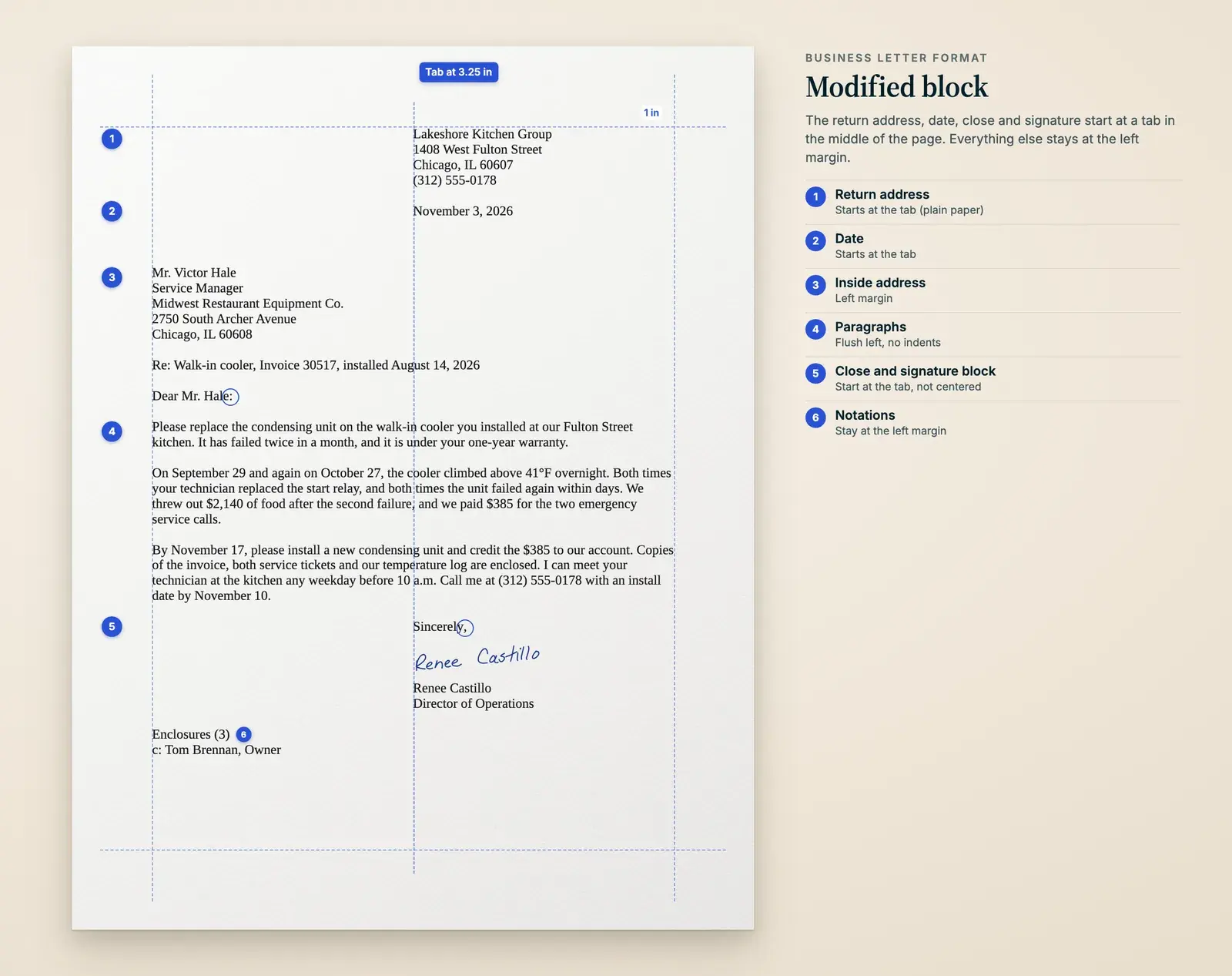
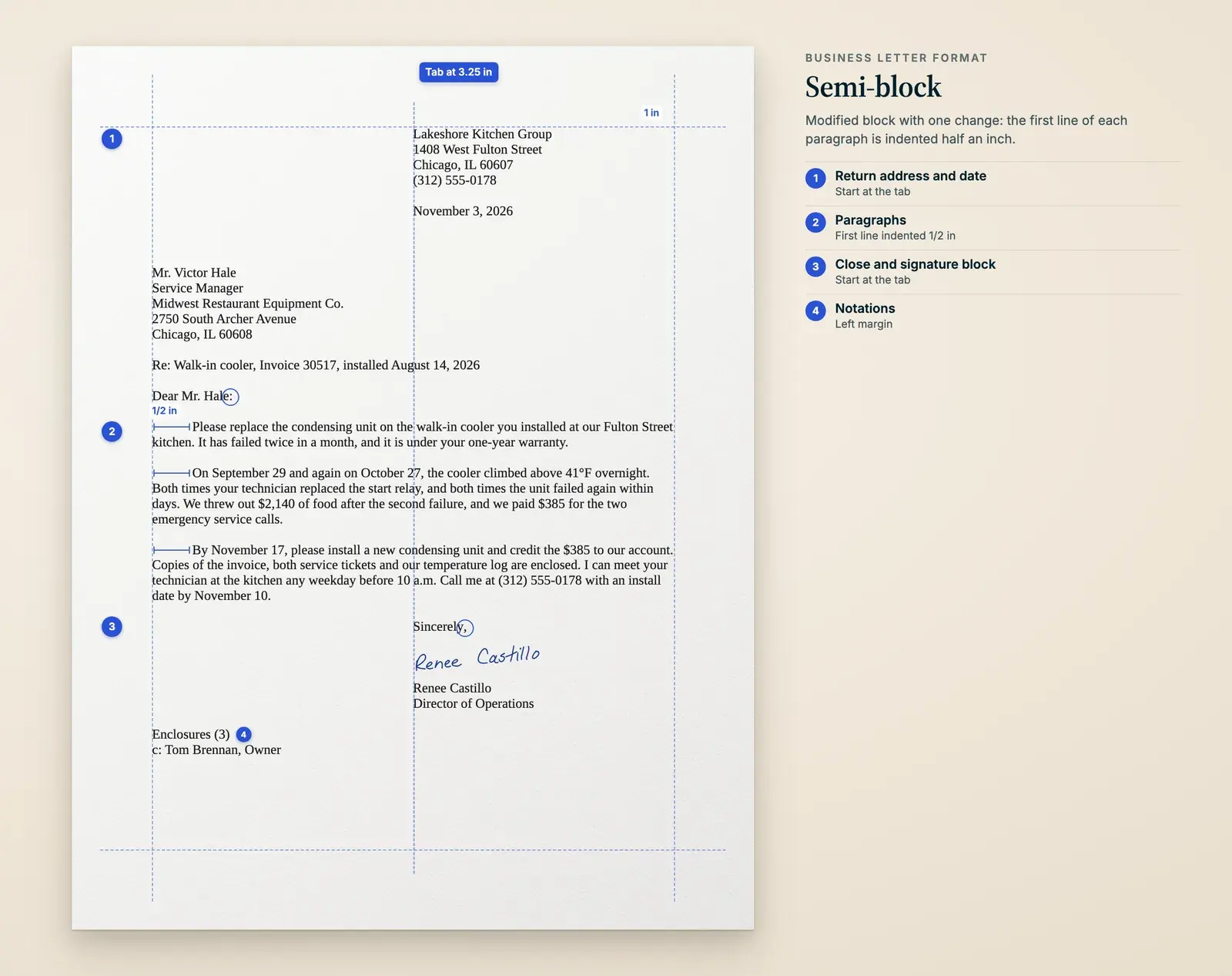
My advice is full block unless your company already uses something else. It's the quickest to type and the hardest to get wrong, because there's no tab stop to drift. Modified block looks more traditional and suits a letter on plain paper, which is where Writing@CSU recommends it; start your return address at the center too, directly above the date. Semi-block is rare now.
Two variations you'll run into. Open punctuation drops the colon after the salutation and the comma after the close. It's correct but less common, so stick with mixed punctuation: colon, then comma. The simplified letter is full block with no salutation and no close, and an all-caps subject line where the greeting would be (Indian Hills Community College still teaches it). It's handy for writing to a department when you have no name to put after Dear.
Business letter examples: four letters you can adapt
All four are full block with mixed punctuation, set out with the spacing you'd actually type. Each carries the details a real letter needs: dates, amounts, names and a deadline. Swap in yours.
Letter to a client announcing a change
BRIGHTSIDE COMMERCIAL CLEANING 2210 Clement Avenue, Suite 4, Alameda, CA 94501 | (510) 555-0143 December 1, 2026 Ms. Lauren Petrakis Office Manager Harbor & Vine Architects 480 Third Street, Suite 300 Oakland, CA 94607 Re: Your cleaning night, starting January 6 Dear Ms. Petrakis: Starting Wednesday, January 6, we'll clean your office on Wednesday nights instead of Tuesdays. Your last Tuesday visit will be December 29. We're moving our Tuesday crew to a new contract, and Wednesday is the night we can keep the same people on your building. Marisol Vega, who has cleaned your suite since 2023, stays with you. Her hours, your alarm code and the key arrangement stay the same, and so does your monthly rate. If Wednesday doesn't work for your team, call me at (510) 555-0143 by December 18, and we'll find another night before the change. Best regards, Andre Whitfield Operations Manager c: Marisol Vega
The change and its date come first. The middle answers what a client asks next (same cleaner? same price?), and the end gives them a way out, with a deadline. Names and businesses are invented.
Formal complaint to a supplier (a warranty claim)
Lakeshore Kitchen Group 1408 West Fulton Street Chicago, IL 60607 (312) 555-0178 November 3, 2026 Mr. Victor Hale Service Manager Midwest Restaurant Equipment Co. 2750 South Archer Avenue Chicago, IL 60608 Re: Walk-in cooler, Invoice 30517, installed August 14, 2026 Dear Mr. Hale: Please replace the condensing unit on the walk-in cooler you installed at our Fulton Street kitchen. It has failed twice in a month, and it is under your one-year warranty. On September 29 and again on October 27, the cooler climbed above 41°F overnight. Both times your technician replaced the start relay, and both times the unit failed again within days. We threw out $2,140 of food after the second failure, and we paid $385 for the two emergency service calls. By November 17, please install a new condensing unit and credit the $385 to our account. Copies of the invoice, both service tickets and our temperature log are enclosed. I can meet your technician at the kitchen any weekday before 10 a.m. Call me at (312) 555-0178 with an install date by November 10. Sincerely, Renee Castillo Director of Operations Enclosures (3) c: Tom Brennan, Owner
Request first, then facts with dates and dollar amounts, then the remedy and a deadline. Keep the tone flat and let the facts argue. If it could end in a dispute, send it Certified Mail and keep a copy. Names and businesses are invented.
Thank-you letter to a client
CALLOWAY PRINT & MAIL 65 Water Street, Burlington, VT 05401 | (802) 555-0119 December 4, 2026 Ms. Denise Achebe Executive Director Champlain Literacy Project 112 Pearl Street Burlington, VT 05401 Dear Denise: Thank you for fifteen years of gala programs. Your first one, in 2012, was a single folded sheet. This year's was 24 pages. The year I remember is 2019, when the hotel flooded nine days before the gala and you moved 300 guests to the armory. You sent us the new seating chart at 11 p.m., and the programs were at the door that Friday with the right table numbers. Afterward you wrote to our press crew and thanked each of them by name. Two of them still have that letter pinned up next to the press. Thank you for trusting us with the night that pays for your tutors. Warm regards, Paul Calloway Owner
One true story from the relationship does more than a page of gratitude, and there's no sales line at the end. He uses her first name because that's what he calls her, still with a colon. For shorter thanks, see how to write a business thank-you note. Names and businesses are invented.
Letter of introduction from a new account contact
Harlow & Finch Insurance 900 North High Street, Suite 210 Columbus, OH 43215 (614) 555-0126 December 7, 2026 Mr. Erik Lindqvist Owner Lindqvist Roofing LLC 4417 Larkspur Avenue Dublin, OH 43017 Dear Mr. Lindqvist: On January 1, I'll take over your business insurance from Bill Okafor, who retires on December 31 after 31 years with Harlow & Finch. You won't be starting over. I've worked on contractors' policies with Bill for six years, and I sat in on your renewal review last March. Your general liability and commercial auto policies renew on March 1, so I'll call in the first week of February to set up the review, with a quote for the second truck you mentioned to Bill. Nothing else changes: same policies, same claims number, same office. My direct line is (614) 555-0126. Bill asked me to pass along one more thing. He still wants to hear how the Worthington library roof turns out. Sincerely, Jenna Marsh Commercial Lines Agent
It answers the reader's real questions: what changes, when they'll hear from her, and whether she knows the account. Introducing yourself to a stranger instead? Our sales prospecting letters are built for that. Names and businesses are invented.
Free business letter templates: full block and modified block
The download has both layouts with every optional part in place, a second-page header, salutations and closings, an email to send with a PDF, the envelope layout and a checklist for before you mail it. Copy the layout you want into Word or Google Docs and delete what you don't need.
Full block template
[Company name] [Street address] [City, State ZIP] [Phone] [Month Day, Year] [Mr./Ms./Dr. First Last] [Job title] [Company] [Street address, Suite] [City, State ZIP] Re: [Invoice, account or project number] Dear [Mr./Ms./Dr. Last name]: [Why you're writing, in one or two sentences.] [The facts the reader needs: dates, amounts, numbers, what has happened so far.] [What you want to happen next, who does it, and by when.] Sincerely, [First Last] [Job title] Enclosure: [Document name] c: [Name]
For modified block, start the date, the close and your typed name at a 3.25-inch tab instead of the left margin. The download has that version laid out.
How to send a business letter: by mail, as a PDF, or both
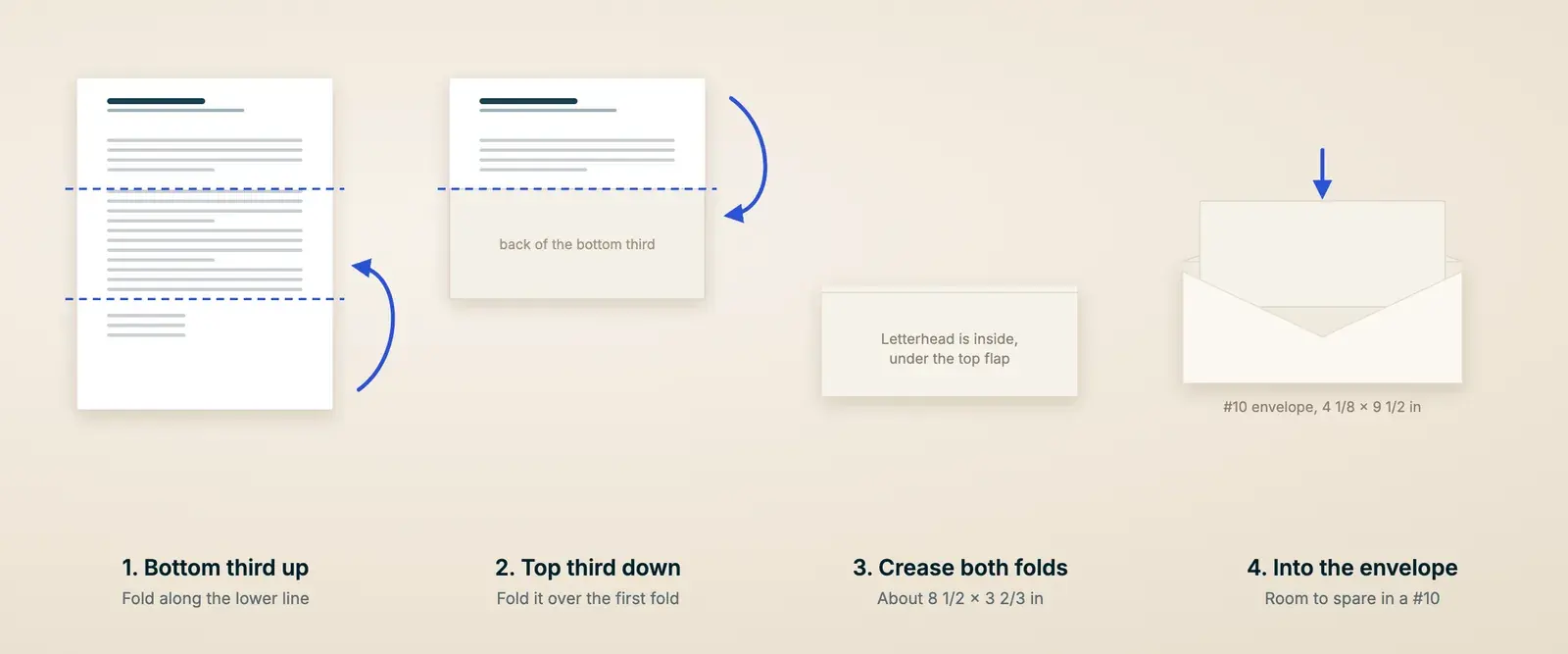
You can mail it, email it as a PDF, or do both. Do both when the letter matters (a claim, a notice, anything you might need to prove later): the PDF arrives today and the signed original follows. To mail it, print page 1 on letterhead, sign it in ink and fold it in thirds for a standard #10 business envelope.
Fold a letter for a #10 envelope
Face up
Lay the letter text side up, with the top edge away from you.
Bottom third up
Fold the bottom of the page up about a third of the way and crease it.
Top third down
Fold the top down over it and crease. The letterhead is now on the inside, and it's the first thing the reader sees when they open the top flap.
Check it
Slide it into the envelope, then pull it out the way your reader will. If the letterhead comes out upside down, turn the letter around.
Window envelopes need a Z-fold instead, so the inside address faces out through the window, and the address has to sit lower on the page. One typing course uses "3-4-3" spacing: three returns before the date, four before the inside address and three before the salutation. Hold a test sheet up to your envelopes before you print fifty.
Address the envelope with the same lines as the inside address, ATTN line first if you used one. Your return address goes in the top left corner and the stamp in the top right, as USPS lays it out. The Postal Service prefers capital letters and lets you leave out punctuation, though a neat address in normal case is fine. Our envelope tool sets it out for you, and the business envelope guide covers job titles, suites and departments.
One 82-cent Forever stamp covers 1 ounce, which USPS puts at about four sheets of paper in a business envelope. Each extra ounce is 29 cents, so weigh anything with enclosures or check it in our stamp calculator.
For a claim or a formal notice, Certified Mail gets you proof that you sent it and a record of when it was delivered, for $5.55 on top of postage. If a contract or lease says how notices must be sent, do exactly that; an email may not count.
To email it, sign the letter and save it as a PDF so the layout can't shift on the reader's screen. Name the file so they can find it later (2026-11-03 Lakeshore warranty claim.pdf). The email should say what's attached and give the one-sentence version, so the reader knows whether to open it now.
Email to send with a PDF letter
Subject: Warranty claim for walk-in cooler, Invoice 30517 (letter attached) Mr. Hale, Attached is our letter about the walk-in cooler at our Fulton Street kitchen. In short: it has failed twice in a month, and we're asking you to replace the condensing unit under warranty by November 17. The signed original is in the mail today. Renee Castillo Director of Operations, Lakeshore Kitchen Group (312) 555-0178
A comma after the name is normal in email. Keep the letter itself in the attachment rather than pasting a second copy into the message.
Some letters land better in handwriting, like thanks to a client of fifteen years or an apology after a bad month. If you have more of those than evenings to write them, Scribble Cards handwrites letters for businesses in real pen and mails them. You send the words. Talk to sales about what you're sending.
Common business letter mistakes and quick fixes
- A comma after the greeting. Business letters take a colon: Dear Mr. Hale:
- "Dear Sir or Madam" or "To Whom It May Concern." Find the name, or use the job title or the department.
- A date in numbers, like 11/17/26. Spell out the month: November 17, 2026.
- An inside address that doesn't match the envelope. Copy one to the other, ATTN line and suite number included.
- Double gaps between paragraphs. Turn off Word's space after paragraphs and use one blank line.
- The point turns up in paragraph three. Move it into the first sentence.
- An enclosure mentioned but not listed. Add the enclosure notation and name the documents.
- "Sincerely Yours" with two capitals. Only the first word gets one: Sincerely yours,
- A layout that drifts, with the date at the center and the close at the left margin. Pick one layout and check every line against it.
Frequently asked questions
What are the parts of a business letter?
In order: letterhead or return address, date, inside address, salutation, body, complimentary close, and your signature with your typed name and title. Optional parts are an attention line (the first line of the inside address), a reference or subject line, and reference initials, enclosure and copy notations at the bottom.
What's the difference between block and modified block format?
In block (full block) format, every line starts at the left margin. In modified block, the date, the complimentary close and the signature block start at the center of the page, at a 3.25-inch tab with 1-inch margins, and everything else stays at the left. Neither indents paragraphs. Semi-block is modified block with the first line of each paragraph indented.
Should I write "Dear Sir or Madam" or "To Whom It May Concern"?
Neither, if you can help it. Find the person's name, or use a job title (Dear Hiring Manager:) or a department (Dear Customer Service Team:). The Mayfield Handbook says to avoid Dear Sir or Madam, and Iowa's business school calls To Whom It May Concern outdated.
Do you use a colon or a comma after Dear in a business letter?
A colon. Write "Dear Mr. Hale:" in a business letter; Purdue's OWL says never a comma. Commas belong in personal letters, and they're normal in email.
How do you sign a business letter?
Type the close (Sincerely,), press Enter four times and type your full name with your job title below it. Sign in ink in the space between. Your signature should match your typed name, though a first name alone is fine for someone you know well, as Writing@CSU notes. For a PDF, add an electronic signature before you send it.
How long should a business letter be?
One page, in three or four short paragraphs. Iowa's Tippie template suggests body paragraphs of around 100 words. If it runs to a second page, add a second-page header and carry at least two lines of the body onto it.
Can I send a business letter by email?
Yes. Attach it as a signed PDF with a short email that says what it is, or paste the text into the email starting at the salutation. Mail a signed copy too when you might need proof later, and always when a contract or lease says notices must go by mail.
What font and size should a business letter use?
A plain font at 11 or 12 point. Times New Roman 12 is the traditional choice, and Arial is fine. Use one font for the whole letter, apart from your letterhead.
Reviewed .